
REMOTE HOTSPOT OPERATOR
Remotely manage, generate accounts and get real time statistics and reports
What is Remote HotSpot Operator ?
The Remote HotSpot Operator is a software add-on which helps you perform desired actions remotely. It is designed for enterprises needing to provide multiple hotspot retail points, spread over a larger area such as holiday resorts and hotels, hospitals etc.
While Antamedia Hotspot is an Internet gateway system which runs your network, meters bandwidth and controls access, HotSpot Operator provides extra points where your guests can obtain tickets for Internet access.
By connecting to the same database, everything is kept simple and consistent. If someone obtains authorization at one place, such as your swimming pool, they can continue using it anywhere you have coverage, with the same login and account level.
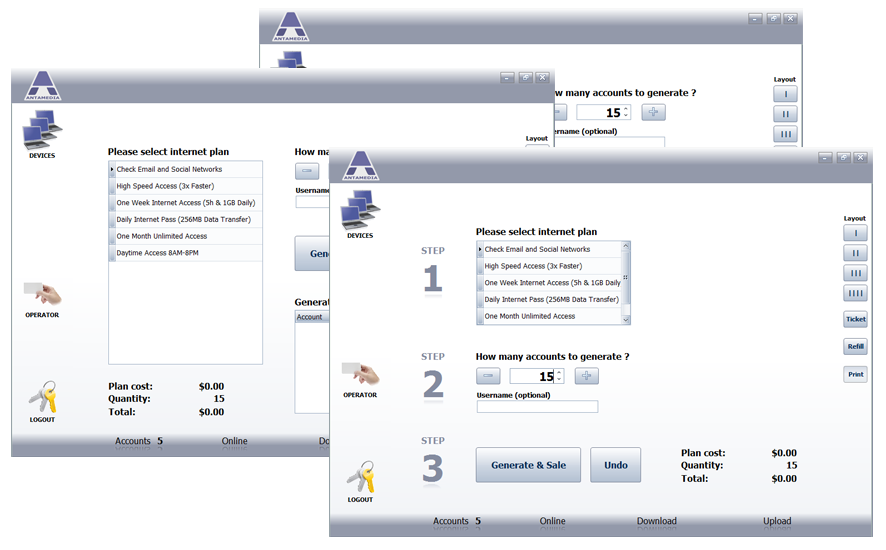
Remote HotSpot Operator Benefits
The most important aspect of additional HotSpot Operator is convenience for your guests, avoiding queues and making full use of the wireless technology.While online registration is possible, many guests will prefer to deal with a human, especially the first time.
There are of course, benefits for you:
Includes management tools for administrators
As the main Administrator (with password) you can use it to generate, modify or delete accounts, view bills and statistics, generate reports, make new employee accounts, configure price plans, send email notifications (account expiry or maintenance reminders) and generally monitor activity.
If you run a chain of hotels or similar, you can perform such monitoring from anywhere that is connected to your network, even from a different city or country
Friendly Interface
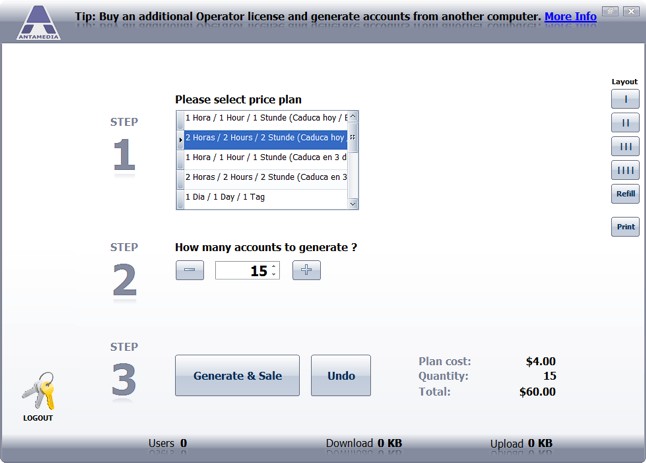
The user interface is very simple and easy, and is designed for seasonal or less experienced staff.
Accounts are generated in 3 easy steps:
1. Choose Price Plan
2. Choose number of the accounts to generate
3. Click ‘Generate’ button!
Hotspot’s user interface is touch screen friendly with large buttons, and several layouts available.
